BLOCK REFERENCE / VARIABLES
Variables
Store and change values: score, lives, states, globals.
18 blocks
#Calculate

Calculates a op b and stores the result in a variable.
The game stops with an error if a or b is not a number (for example a template pointing to a variable that does not exist), when dividing by zero, or when the target object is not found.
| Field | What it means |
|---|---|
settext | Variable to write: hp (this object), Enemy.hp (another object) or global.hp (global).Default: score |
to {…}text | First number. Accepts {templates} such as {score} or {Enemy.hp}.Default: {score} |
opdropdown | Operation: +, -, *, /, min, max or random (a whole number from a to b, both included).Options: + · - · * · / · min · max · random |
{…}text | Second number. Accepts {templates}.Default: 1 |
roundingdropdown | Rounding applied to the result: off, round (halves go up), floor (down) or ceil (up).Options: off · round · floor · ceil |
Example Set damage to {attack} - {Enemy.defense} with rounding round.
#Change global variable

Adds an amount to a global variable.
| Field | What it means |
|---|---|
globaltext | Name of the global variable. Missing or non-number values start from 0.Default: gold |
by {…}text | Number to add (negative to subtract). Accepts {templates}; text that is not a number stops the game with an error.Default: 1 |
#Change Variable

Adds an amount to one of this object's variables.
If the variable is missing or does not hold a number, it is treated as 0 first. The result is stored as a decimal number.
| Field | What it means |
|---|---|
Variabledropdown | Variable of this object, from the variables defined in its Variables panel.Default: score |
Bynumber | Number to add. Use a negative number to subtract.Default: 1 |
Bysocket | Number to add. Use a negative number to subtract.Default: number, any |
Example Change Variable score by 1 when a coin is collected.
#Change variable of object

Adds an amount to a variable on another object.
| Field | What it means |
|---|---|
objecttext | Name of the object (not case sensitive). Leave empty for this object.Default: Player |
variabletext | Variable to change on that object. Missing or non-number values start from 0.Default: score |
amountnumber | Number to add. Use a negative number to subtract.Default: 1 |
Example From a coin: Change variable of object Player score by 1, then destroy the coin.
#Clear all global variables
Deletes every global variable.
After this, Global variable returns 0 for any name. Object variables are not affected.
Example Run it when the player picks New Game in the title menu.
#Compare variable

True when one of this object's variables compares to a value as chosen.
Numbers are compared as numbers. If either side is not a number, they are compared as text ignoring case, and only = and != can be true.
| Field | What it means |
|---|---|
variabledropdown | Variable of this object, from the variables defined in its Variables panel. A missing variable counts as 0.Default: score |
isdropdown | Comparison: =, !=, <, >, <= or >=.Options: = · != · < · > · <= · >= |
valuetext | Value to compare with (typed, no templates).Default: 0 |
Example Compare variable hp <= 0 inside If to handle a defeat.
#Count down variable
Subtracts the frame time in seconds from a variable, stopping at 0.
Put it inside On Update so the variable goes down by one each real second. It never goes below 0.
| Field | What it means |
|---|---|
variabledropdown | Variable of this object, from the variables defined in its Variables panel. A missing variable counts as 0.Default: cooldown |
Example Set cooldown to 0.5 when shooting and only allow a new shot when cooldown is 0.
#Get Variable
Returns the current value of one of this object's variables.
In a number socket, true counts as 1, false as 0, and text that is not a number as 0. In a condition socket, 0, empty text and false count as false.
| Field | What it means |
|---|---|
Variabledropdown | Variable of this object, from the variables defined in its Variables panel.Default: score |
#Global variable
Returns the value of a global variable, or 0 if it does not exist yet.
| Field | What it means |
|---|---|
nametext | Name of the global variable (typed exactly, case sensitive).Default: gold |
#Hide Variable
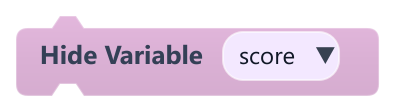
Hides a variable previously shown with Show Variable.
| Field | What it means |
|---|---|
Variabledropdown | Variable of this object, from the variables defined in its Variables panel.Default: score |
#Look up in table

Sets a variable to the value stored for a key in a key=value table.
Numbers and true/false in the result are converted; other values are stored as text. An entry without = stops the game with an error.
| Field | What it means |
|---|---|
settext | Variable to write: hp (this object), Enemy.hp (another object) or global.hp (global).Default: price |
key {…}text | Key to look for, not case sensitive. Accepts {templates} such as {item}.Default: {item} |
tabletext | Entries written as key=value separated by |, for example apple=3|pear=5. Values may contain {templates}.Default: apple=3|pear=5 |
defaulttext | Value used when the key is not in the table. Accepts {templates}.Default: 0 |
#Pick random item

Sets a variable to one random item from a list separated by |.
Numbers and true/false are converted. If there are no items, the game stops with an error.
| Field | What it means |
|---|---|
settext | Variable to write: hp (this object), Enemy.hp (another object) or global.hp (global).Default: choice |
fromtext | Options separated by |, for example red|green|blue. Accepts {templates}. Empty items are skipped.Default: red|green|blue |
#Remember best score

Stores the highest value a variable has reached in another variable, even across restarts.
The best value is remembered for the whole play session, so it survives Restart game, but it is not saved to disk when the game closes. Both names are required, or the game stops with an error.
| Field | What it means |
|---|---|
variabletext | Variable of this object to watch, such as score.Default: score |
best intext | Variable of this object that receives the best value, such as best.Default: best |
#Set global if missing

Sets a global variable only if it does not exist yet.
Useful in When Game Starts so a scene works when you play it on its own, without overwriting values carried from an earlier scene.
| Field | What it means |
|---|---|
globaltext | Name of the global variable.Default: gold |
to {…}text | Starting value. Accepts {templates}. Numbers and true/false are converted.Default: 0 |
#Set global variable

Sets a game-wide global variable that is kept when another scene loads.
Read it with Global variable or as {global.name} in templates. Restart game puts globals back to the values they had when the scene started.
| Field | What it means |
|---|---|
globaltext | Name of the global variable.Default: gold |
to {…}text | New value. Accepts {templates}. Numbers and true/false are converted; anything else is stored as text.Default: 0 |
#Set Variable

Sets one of this object's variables to a value.
The variable is created if it does not exist yet. Each object (and each clone) has its own copy.
| Field | What it means |
|---|---|
Variabledropdown | Variable of this object, from the variables defined in its Variables panel.Default: score |
Typedropdown | Type of the typed value: bool, int, float or string. Ignored when a block is plugged into value.Options: bool · int · float · string |
Booldropdown | Value used when the type is bool: true or false.Options: true · false |
Intnumber | Value used when the type is int. Decimals are cut off (3.9 becomes 3).Default: 0 |
Floatnumber | Value used when the type is float.Default: 0 |
Stringtext | Value used when the type is string.Default: text |
Valuesocket | Optional socket. A connected block (math, text, list item, object...) is stored as is and overrides the typed value.Default: number, string, boolean, object, any |
#Set variable of object

Sets a variable on another object, creating it if needed.
If no object has that name, nothing happens.
| Field | What it means |
|---|---|
objecttext | Name of the object (not case sensitive). If several share the name, the first one found is used. Leave empty for this object.Default: Player |
variabletext | Variable to set on that object.Default: score |
valuetext | New value. Accepts {templates}. Numbers and true/false are converted; anything else is stored as text.Default: 0 |
#Show Variable
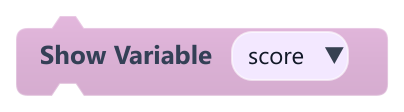
Shows a variable and its live value in the corner of the game view.
The value appears as name: value at the top-left of the game view and updates every frame. The variable must already exist when the block runs, otherwise nothing is shown.
| Field | What it means |
|---|---|
Variabledropdown | Variable of this object, from the variables defined in its Variables panel.Default: score |
Example Use it in When Game Starts to watch a value while you test.