BLOCK REFERENCE / CAMERA
Camera
Follow the player, zoom, bounds and camera shake.
9 blocks
#Fade screen
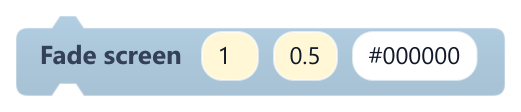
Fades a full-screen colour in or out over everything, including UI.
The overlay moves at a steady rate toward the target opacity. The script does not wait for it; add a Wait with the same seconds if needed. If the screen is still mostly covered when a new scene loads, that scene fades back in by itself.
| Field | What it means |
|---|---|
to opacitynumber | Target opacity from 0 (clear) to 1 (fully covered).Default: 1 |
secondsnumber | Length of the fade (0 to 60); 0 is instant.Default: 0.5 |
colortext | Colour as a hex code, e.g. #000000 for black.Default: #000000 |
#Follow Object

Makes the camera follow an object, centring the view on it every frame.
The view centres on the object's x, y, which is its top-left corner, and this overrides the scene's Camera object. It keeps following until you run it again; an empty or unknown name stops following. For a smooth follow, use Follow object smoothly on the Camera.
| Field | What it means |
|---|---|
Objecttext | Name of the object to follow.Default: Player |
#Follow object smoothly

Eases this object toward another object's centre; on a Camera it makes a smooth follow camera.
Use it in On Update. Each frame it covers part of the remaining distance, so it slows down as it arrives. A Camera's position is the centre of the view, so the target ends up centred on screen.
| Field | What it means |
|---|---|
objecttext | Object to follow; it cannot be this object.Default: Player |
smoothingnumber | Higher is snappier (0 to 60); 0 jumps straight to the target.Default: 6 |
offset xnumber | Horizontal offset from the target's centre, in pixels.Default: 0 |
offset ynumber | Vertical offset from the target's centre, in pixels; positive is below it.Default: 0 |
Example Put it on the Camera with Player and a small negative offset_y to show more of what is above.
#Move Camera By

Shifts the camera by an x, y offset. Reserved: currently has no lasting effect at runtime.
Every frame the engine places the camera on the followed object, the scene's Camera object or 0, 0, which overwrites this change. To move the view, move the Camera object with Motion blocks.
| Field | What it means |
|---|---|
Xnumber | Horizontal offset in pixels.Default: 0 |
Ynumber | Vertical offset in pixels.Default: 0 |
Xsocket | Horizontal offset in pixels.Default: number, any |
Ysocket | Vertical offset in pixels.Default: number, any |
#Parallax with camera
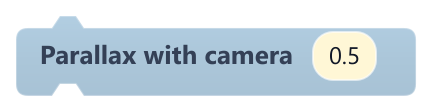
Links this object to the camera so it scrolls at a fraction of the camera's movement, for parallax backgrounds.
Run it once, for example in When Game Starts. It remembers where the object and the camera were at that moment; running it again only changes the factor. While linked, the object's own movement is overridden.
| Field | What it means |
|---|---|
factornumber | 1 = fixed on screen, 0 = fixed in the world, 0.5 = half speed for distant layers (-4 to 4).Default: 0.5 |
#Pin to screen
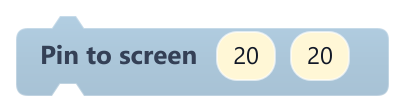
Keeps this object at a fixed spot on the screen, for HUD elements.
Run it once; from then on the object stays at that screen position every frame, whatever the camera does. The position accounts for zoom, but the object's size still scales with it.
| Field | What it means |
|---|---|
xnumber | Pixels from the left edge of the game view to the object's left edge (label x).Default: 20 |
ynumber | Pixels from the top edge of the game view to the object's top edge (label y).Default: 20 |
Example Pin a heart icon at 20, 20 in When Game Starts.
#Set Camera Position

Moves the camera to a world position. Reserved: currently has no lasting effect at runtime.
Every frame the engine places the camera on the followed object, the scene's Camera object or 0, 0, which overwrites this position. To move the view, move the Camera object with Motion blocks.
| Field | What it means |
|---|---|
Xnumber | X of the view centre, in pixels.Default: 0 |
Ynumber | Y of the view centre, in pixels.Default: 0 |
Xsocket | X of the view centre, in pixels.Default: number, any |
Ysocket | Y of the view centre, in pixels.Default: number, any |
#Set Zoom
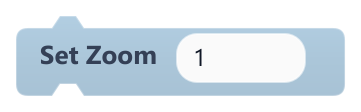
Sets the camera zoom.
1 is normal size, 2 shows everything twice as big and 0.5 shows twice as much of the world. The minimum is 0.05. The zoom stays until you change it.
| Field | What it means |
|---|---|
Zoomnumber | Zoom factor.Default: 1 |
Zoomsocket | Zoom factor.Default: number, any |
#Shake Camera
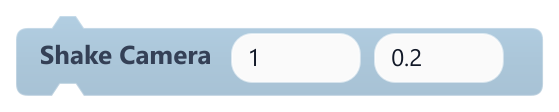
Shakes the camera for a short time.
During the shake the view jumps each frame by a random offset of up to intensity pixels on each axis. A new shake replaces the current one. The default of 1 is barely visible; try 5 to 15.
| Field | What it means |
|---|---|
Intensitynumber | Largest offset in pixels.Default: 1 |
Durationnumber | Length of the shake in seconds.Default: 0.2 |
Intensitysocket | Largest offset in pixels.Default: number, any |
Durationsocket | Length of the shake in seconds.Default: number, any |
Example Shake with 8 for 0.3 seconds when the player takes damage.