PYBLOCKS / DOCS
PyBlocks Lab: custom Python blocks
Write your own blocks in Python, load them into the block palette, and share them with other projects as .pbblock packages.
#Open the Lab
Open a project, then press Ctrl+Shift+L (or use Tools → PyBlocks Lab, the Lab button in the workspace rail, or Ctrl+6). Each project keeps its Python modules in its own plugins/ folder.
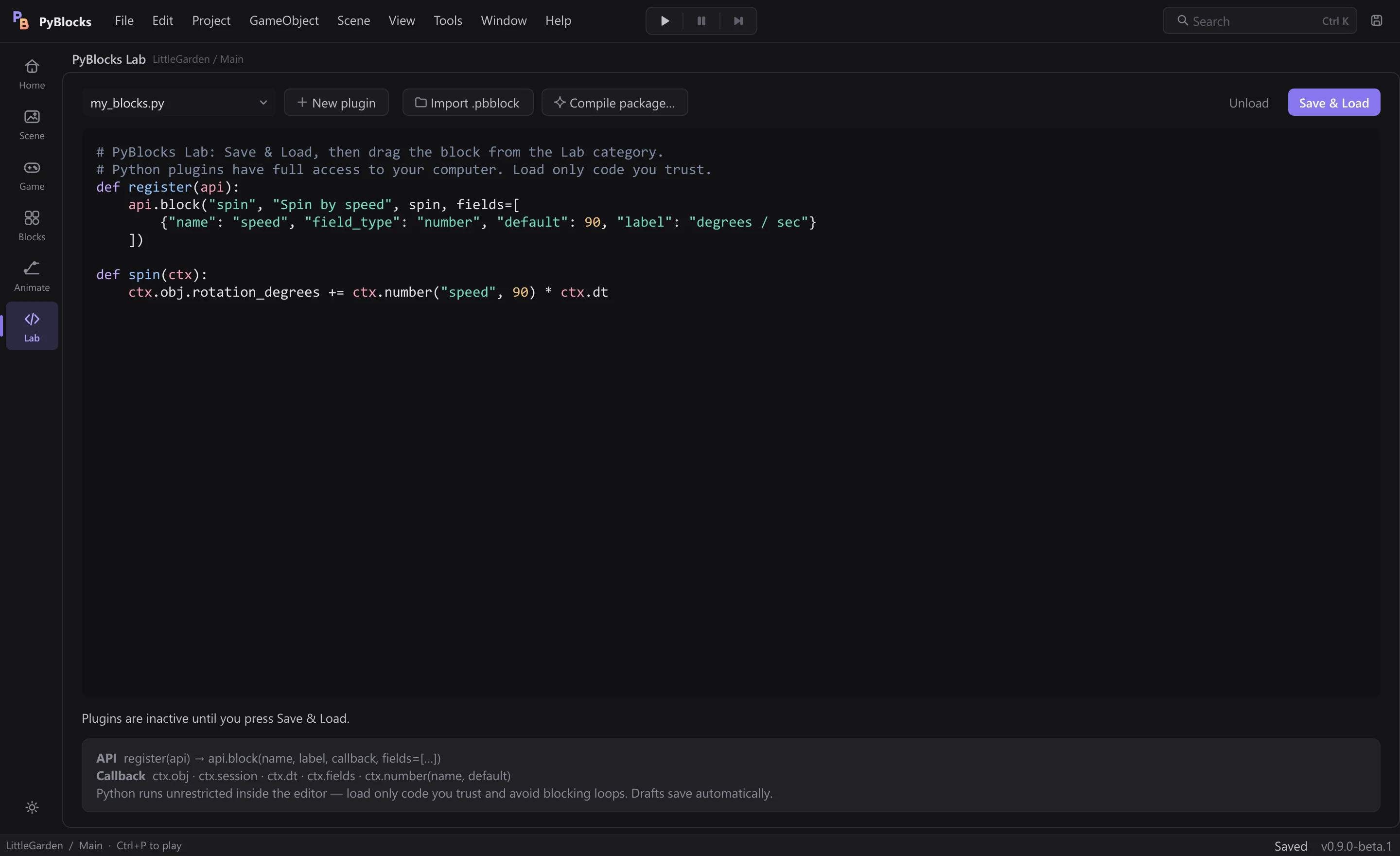
- The list at the top shows the
.pyfiles inplugins/. New plugincreates a module from a working template.Import .pbblockandCompile package…read and write block packages.Unloadremoves the module's blocks from the palette;Save & Load(Ctrl+Enter) saves the module and registers its blocks.- The status line under the editor tells you what happened, including load errors.
Drafts are saved to disk automatically while you type, but the palette only changes when you press Save & Load.
#Make your first block
- Click
New pluginand type a name with lowercase letters, digits and underscores that starts with a letter, for examplemy_blocks. - The new module already contains a sample block,
Spin by speed. - Press
Save & Load. The status line says how many blocks were loaded. - Go to the Blocks workspace, find the block in the Lab category and snap it under
On Update. - Press Ctrl+P: the object spins.
def register(api):
    api.block("spin", "Spin by speed", spin, fields=[
        {"name": "speed", "field_type": "number", "default": 90, "label": "degrees / sec"}
    ])

def spin(ctx):
    ctx.obj.rotation_degrees += ctx.number("speed", 90) * ctx.dt
Each block gets a stable ID made of the file name and the block name, for example lab_my_blocks.spin. Renaming the file or the block breaks scripts that already use it.
#The block API
A module must define register(api) and register at least one block with api.block(name, label, callback, fields=[...]). The optional color and category arguments default to "#a78bfa" and "Lab".
name: a lowercase identifier, unique in the module.label: the text shown on the block.fields: a list of dictionaries withname,field_type(number,text,booleanordropdown),default,labeland, for dropdowns,options.callback(ctx): runs each time the block runs.
The callback receives ctx with ctx.obj (the running object: position, rotation, variables…), ctx.session (the engine session: objects, input, animation, particles), ctx.dt (seconds of the current frame), ctx.fields (the block's field values) and ctx.number(name, default), which returns a number and raises an error for invalid values. For example, ctx.session.particles.emit(ctx.obj.x, ctx.obj.y, count=24) emits particles.
This first version of the API only creates stack blocks. It cannot add new events, reporters, C-blocks or editor panels.
If a reload fails, the previous working version stays registered and the status line shows the error. Errors inside a callback while the game runs go through the normal block diagnostics and name the block that failed. Loading or unloading a module stops the running game.
#Block packages (.pbblock)
Compile package… turns the open module into a portable .pbblock file. It checks that the package ID (the module's file name) starts with a lowercase letter and uses only lowercase letters, digits and underscores (64 characters at most), that the source is 512 KB or less, and that it defines register(api).
my_blocks.pbblock  (a zip file)
├── manifest.json
└── plugin.py

manifest.json:
{
  "format": "pyblocks.block-package",
  "version": 1,
  "api_version": 1,
  "id": "my_blocks",
  "entrypoint": "plugin.py",
  "sha256": "<SHA-256 of plugin.py>"
}
Import .pbblock checks the format, the API version and the checksum, then copies plugin.py to plugins/<id>.py. It never runs the code and never overwrites a module with the same ID. Read the imported code in the editor, then press Save & Load to activate it.
#Third-party code
Lab plugins are ordinary Python with full access to your computer. There is no sandbox: callbacks run on the editor thread, and the loop limit that protects block scripts does not stop an endless Python loop. Avoid blocking calls, long waits and unbounded loops.
Code that was not written on this computer, such as an imported package or a plugin that came inside a copied project, does not run until you confirm it. When you press Save & Load, a Load third-party code? window shows the package ID and the file it came from, with the SHA-256 of the code under the details. Cancel is the default.
Loadremembers your trust for that exact code.- Editing third-party code does not make it trusted: the edited version asks once more.
- Code you type in the Lab, and modules created with
New plugin, load without asking. - Opening a project never runs its plugins; they stay inactive until you press
Save & Load. Switching projects unloads them.
#Lab blocks in exported games
When you export a game, PyBlocks includes the loaded modules that the included scenes use, in GameData/plugins. It copies the last version that loaded successfully, even if your current draft has errors.
If a scene uses a Lab block whose module is not loaded, the export stops and lists the blocks to load first. Third-party Python packages that your plugin imports are not bundled with the game.